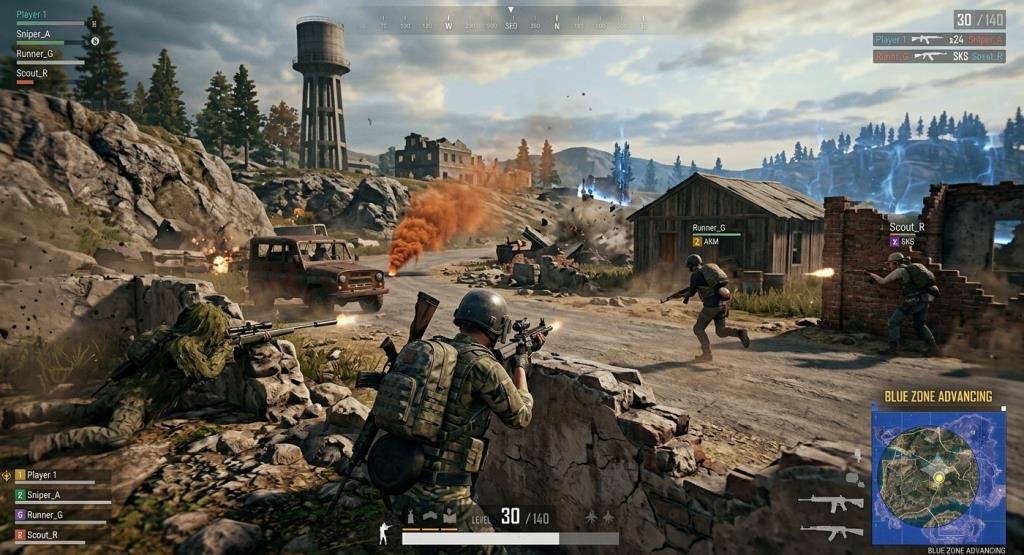

PUBG Battlegrounds has remained one of the most influential battle royale games since its release, offering an exciting mix of survival, tactical combat, and strategic decision-making. Unlike many fast-paced shooters, PUBG rewards patience, planning, teamwork, and smart positioning just as much as quick reflexes. Every match presents a fresh challenge, where players must gather weapons, manage resources, survive the shrinking play zone, and outlast opponents to claim the iconic Winner Winner Chicken Dinner.
Whether you’re playing your very first match or looking to sharpen your competitive skills, understanding the game’s mechanics is the key to consistent improvement. From selecting the right landing spot to optimizing your graphics and sensitivity settings, every decision can influence the outcome of a match.
What Is PUBG Battlegrounds?
PUBG Battlegrounds is a multiplayer online battle royale game developed by KRAFTON. The objective is simple but challenging: survive against dozens of other players on a large map until only one player or team remains.
Each match begins with players parachuting onto an island, where they must search for weapons, armor, healing items, and equipment while avoiding elimination. As the match progresses, a shrinking safe zone forces players closer together, creating intense firefights and strategic encounters.
PUBG emphasizes realistic weapon mechanics, bullet travel, recoil control, and tactical positioning. This balance of realism and strategy has helped the game maintain a dedicated global player base for years.
Read More: FurtherBusiness com: Complete Guide to Features, Benefits & Business Resources
How PUBG Battlegrounds Gameplay Works
One of PUBG’s biggest strengths is its simple concept combined with deep strategic gameplay. Every match follows a familiar structure, but no two games feel exactly the same.
Landing Phase
The game starts with every player aboard an airplane flying across the map. Choosing the right landing location is one of the most important decisions you’ll make. High-loot areas often attract more players, increasing the risk of early elimination, while quieter locations allow safer looting.
Looting and Equipment
After landing, your priority is collecting essential gear, including:
- Weapons
- Ammunition
- Helmets
- Body armor
- Backpacks
- Healing items
- Grenades
- Attachments
Efficient looting helps you prepare for mid-game battles without wasting valuable time.
The Blue Zone
As the match progresses, the playable area gradually shrinks. Players caught outside the safe zone take continuous damage from the Blue Zone. Successful players constantly monitor the map, rotate early, and avoid being trapped outside the circle.
Combat
PUBG rewards precision and patience. Every weapon has unique recoil patterns, damage values, firing rates, and effective ranges. Learning when to engage and when to avoid unnecessary fights often determines long-term survival.
Winning the Match
Victory belongs to the last surviving player or squad. Success requires balancing aggression with smart positioning, resource management, and careful decision-making throughout every phase of the game.
PUBG Battlegrounds Game Modes
PUBG offers several game modes designed for different playstyles and skill levels.
Solo Mode: In Solo Mode, every player competes independently. There are no teammates to revive you, making every decision critical. This mode is excellent for improving individual skills and game awareness.
Duo Mode: Duo Mode allows two players to work together. Good communication and teamwork significantly improve survival chances while maintaining a manageable team size.
Squad Mode: Squad Mode features teams of four players. Coordinated strategies, shared resources, and effective communication become even more important. It remains one of PUBG’s most popular modes.
Ranked Mode: Ranked Mode is designed for competitive players seeking higher-level matches. Performance affects your rank, encouraging more strategic gameplay and teamwork.
Casual Mode: Casual Mode provides a more relaxed experience for beginners or players who simply want to enjoy the game without intense competition.
Arcade Modes: Arcade Modes introduce faster-paced gameplay with unique rules, offering an enjoyable alternative to standard battle royale matches.
PUBG Battlegrounds Maps Explained
Each map in PUBG Battlegrounds offers a unique environment, requiring different strategies and playstyles.
Erangel: Erangel is PUBG’s original and most iconic map. It features balanced terrain with cities, forests, hills, and open fields, making it ideal for both beginners and experienced players.
Miramar: Miramar is a large desert map known for long-range engagements and open landscapes. Sniper rifles and careful positioning play a significant role here.
Sanhok: Sanhok is a smaller tropical map that encourages aggressive gameplay and frequent combat due to its compact size.
Vikendi: Vikendi combines snowy landscapes with diverse terrain, allowing for balanced combat across both close-quarters and long-range encounters.
Taego: Taego offers large urban areas alongside rural landscapes. It introduces additional tactical opportunities and supports multiple playstyles.
Deston: Deston features modern cities, wetlands, industrial zones, and vertical gameplay elements. Players must adapt to varied combat situations throughout the match.
Best PUBG Battlegrounds Settings
Proper settings can dramatically improve your gameplay experience. While preferences vary between players, optimizing performance is generally more important than maximizing visual quality.
Graphics Settings
For competitive gameplay:
- Display Mode: Fullscreen
- Resolution: Native resolution
- Texture Quality: Medium or High
- Shadows: Very Low
- Effects: Low
- Foliage: Very Low
- View Distance: Medium
- Anti-Aliasing: Medium
Lower graphics settings often provide smoother frame rates and make enemy movement easier to spot.
Sensitivity Settings
A comfortable sensitivity helps maintain accurate aim. General recommendations include:
- Moderate camera sensitivity
- Slightly lower ADS sensitivity
- Consistent scope sensitivity across different zoom levels
Instead of copying professional players, experiment during training sessions to find settings that feel natural for your playstyle.
Audio Settings
Sound plays a major role in PUBG. For the best experience:
- Increase master volume.
- Use high-quality stereo headphones.
- Enable directional audio.
- Lower background music during matches.
Clear audio helps identify footsteps, vehicles, and nearby gunfire before enemies become visible.
Key Bindings
Customize key bindings for faster reactions. Many experienced players assign commonly used actions—such as healing, grenade selection, or leaning—to easily accessible keys. Choose a layout that feels comfortable and allows quick, consistent inputs.
Performance Optimization
If you experience lag or frame drops:
- Close unnecessary background applications.
- Keep graphics drivers updated.
- Use an SSD if available.
- Reduce unnecessary visual effects.
- Maintain a stable internet connection.
- Monitor your system temperature to prevent thermal throttling.
Optimizing your PC can provide smoother gameplay, lower input delay, and a more consistent competitive experience.
PUBG Battlegrounds Weapons Guide
Choosing the right weapon is one of the most important decisions in PUBG Battlegrounds. Every weapon category has unique strengths, and understanding when to use each one can greatly improve your chances of survival.
Assault Rifles (ARs)
Assault rifles are the most versatile weapons in the game. They perform well in close-, medium-, and even long-range fights when equipped with the right attachments. Popular choices include:
- M416
- AUG
- Beryl M762
- ACE32
- AKM
These rifles offer excellent damage, reliability, and flexibility, making them suitable for nearly every match.
Sniper Rifles
Sniper rifles excel at long-range engagements. A well-placed headshot can instantly eliminate an opponent wearing lower-level gear. Top sniper rifles include:
- AWM
- Kar98k
- M24
Patience, positioning, and accurate aim are essential when using sniper rifles.
Designated Marksman Rifles (DMRs)
DMRs bridge the gap between assault rifles and sniper rifles. They offer semi-automatic precision while allowing faster follow-up shots. Popular DMRs:
- Mini-14
- SLR
- SKS
- Mk12
These weapons are ideal for players who enjoy controlled, medium-to-long-range combat.
Submachine Guns (SMGs)
SMGs dominate close-range encounters thanks to their fast fire rate and manageable recoil. Examples include:
- UMP45
- Vector
- MP5K
- Tommy Gun
They are excellent choices for aggressive players, especially during the early stages of a match.
Shotguns
Shotguns deliver devastating damage at very close range. While their effectiveness drops quickly with distance, they are unmatched inside buildings. Popular options:
- S1897
- DBS
- S12K
Throwables
Throwables often decide late-game fights. Useful throwables include:
- Frag Grenades
- Smoke Grenades
- Stun Grenades
- Molotov Cocktails
Learning when to use each throwable can create opportunities without exposing yourself to unnecessary risk.
Best Weapon Combination
For balanced gameplay, consider pairing:
- Assault Rifle + Sniper Rifle for versatility across all distances.
- Assault Rifle + DMR for consistent medium- and long-range pressure.
- SMG + DMR for aggressive players who prioritize mobility.
Your ideal loadout should match your preferred playstyle while adapting to the available loot.
Winning Strategies for PUBG Battlegrounds
Success in PUBG isn’t just about aiming well. Smart decision-making often separates experienced players from beginners.
Choose Your Landing Spot Wisely
Avoid crowded hot-drop locations if you’re still learning the game. Landing in quieter areas gives you time to collect quality equipment before engaging enemies.
Loot Efficiently
Don’t spend too long searching every building. Once you have:
- A reliable primary weapon
- A secondary weapon
- Armor
- A helmet
- Medical supplies
- Enough ammunition
Start rotating toward the safe zone.
Master Positioning
Strong positioning frequently wins battles before the shooting even begins. Look for:
- High ground
- Natural cover
- Buildings with multiple exits
- Safe rotation routes
Avoid standing in open fields whenever possible.
Rotate Early
Many players wait too long before moving into the safe zone. Rotating early allows you to secure advantageous positions and reduces the risk of getting caught by the Blue Zone.
Use Sound to Your Advantage
Footsteps, gunfire, vehicles, and broken windows all provide valuable information. Good players often hear opponents before they see them.
Communicate With Your Squad
If you’re playing Squad Mode:
- Share enemy locations clearly.
- Mark important loot.
- Coordinate pushes.
- Revive teammates safely.
- Avoid splitting too far apart.
Strong teamwork consistently outperforms individual skill.
PUBG Battlegrounds Tips at a Glance
| Gameplay Area | Best Practice |
| Landing | Choose locations based on your experience level and desired playstyle. |
| Looting | Prioritize weapons, armor, healing items, and ammo before searching for extras. |
| Positioning | Stay near cover and use high ground whenever possible. |
| Safe Zone | Rotate early instead of waiting until the last moment. |
| Combat | Fire only when you have a good chance of securing the elimination. |
| Teamwork | Communicate consistently and support your teammates. |
| Endgame | Stay patient, avoid unnecessary fights, and let opponents expose themselves first. |
PUBG Battlegrounds System Requirements
Before playing, ensure your PC meets the game’s requirements.
Minimum Requirements
- Operating System: Windows 10 (64-bit)
- Processor: Intel Core i5-4430 or AMD FX-6300
- Memory: 8 GB RAM
- Graphics: NVIDIA GeForce GTX 960 or AMD Radeon R7 370
- Storage: Approximately 50 GB of available space
Recommended Requirements
- Operating System: Windows 10/11 (64-bit)
- Processor: Intel Core i5-6600K or AMD Ryzen 5 series
- Memory: 16 GB RAM
- Graphics: NVIDIA GeForce GTX 1060 or higher
- SSD recommended for faster loading times
Using updated hardware provides smoother gameplay, more stable frame rates, and a better overall experience.
Pros and Cons of PUBG Battlegrounds
Pros
- Realistic and immersive gameplay
- Large variety of maps
- Strategic combat system
- Multiple game modes
- Regular updates and seasonal content
- Competitive ranked mode
- Strong emphasis on teamwork
Cons
- Steep learning curve for beginners
- Long match durations
- Requires good hardware for optimal performance
- Competitive environment can be challenging
- Success depends heavily on positioning and decision-making
Conclusion
PUBG Battlegrounds remains one of the most engaging and rewarding battle royale games available today. Its combination of realistic gunplay, strategic gameplay, diverse maps, and intense survival mechanics creates a unique experience that appeals to both casual and competitive players.
Improving in PUBG takes time, but consistent practice makes a noticeable difference. Learning the strengths of different weapons, choosing smart landing locations, optimizing your settings, and making better tactical decisions will gradually improve your performance. Remember that winning isn’t only about eliminating opponents—it’s also about positioning, patience, teamwork, and adapting to each match.
FAQs
Q1. What is PUBG Battlegrounds?
Ans: PUBG Battlegrounds is a multiplayer battle royale game where players compete to be the last individual or team standing by looting equipment, surviving the shrinking play zone, and eliminating opponents.
Q2. Is PUBG Battlegrounds free to play?
Ans: Yes. PUBG Battlegrounds is free to play on supported platforms, though it also offers optional in-game purchases such as cosmetic items and premium passes.
Q3. What are the best settings for PUBG Battlegrounds?
Ans: Lower graphics settings, optimized sensitivity, clear audio, and customized key bindings generally provide smoother gameplay and better competitive performance.
Q4. Which map is best for beginners?
Ans: Erangel is widely considered the best map for beginners because it offers balanced terrain, familiar landmarks, and a mix of combat situations that help new players learn the game’s mechanics.
Q5. What is the best weapon combination in PUBG Battlegrounds?
Ans: A popular combination is an Assault Rifle paired with a Sniper Rifle or DMR, giving you flexibility in both close- and long-range engagements.
Q6. How can I improve my aim in PUBG Battlegrounds?
Ans: Practice regularly in the training mode, adjust your sensitivity settings, learn recoil control, and use the right attachments to improve accuracy and consistency.
Q7. How do I win more Chicken Dinners?
Ans: Focus on smart positioning, early rotations, efficient looting, good communication with teammates, and choosing fights carefully instead of engaging every opponent.